Where this project came from
I built DIY Arduino Dashboard when I was regularly driving across Europe in Euro Truck Simulator 2 and wanted to add more physical feel to that experience. I was not interested in a basic button panel or a few loose LEDs on a desk. I wanted a complete gauge unit in a proper enclosure, something that looked like a real cockpit fragment and reacted to what was happening in the game.
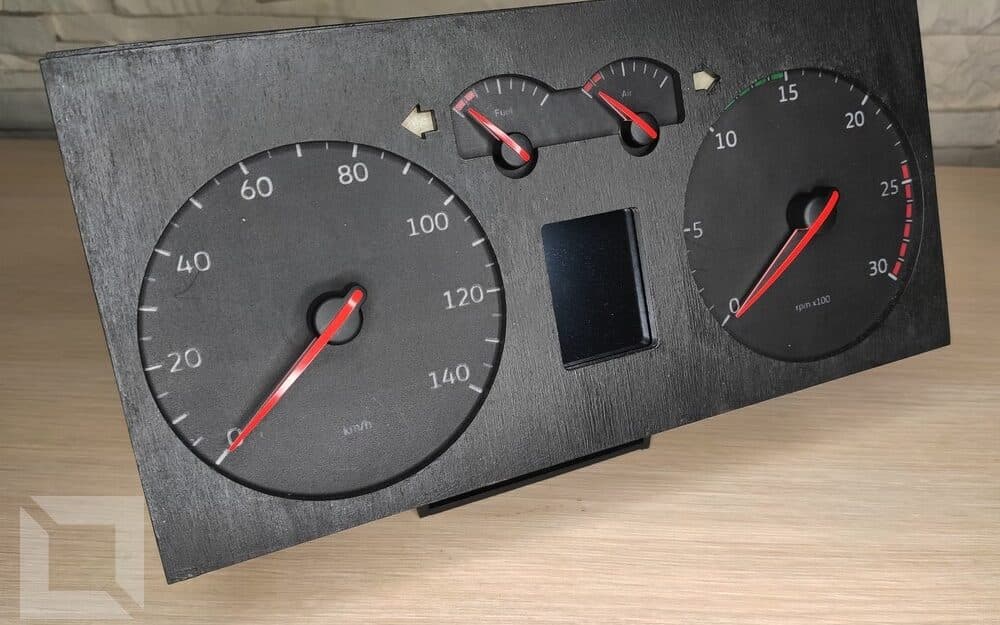
In practice, this meant combining several layers: electronics, Arduino software, a desktop telemetry application, and visual design for custom gauge faces and indicators. These were my first serious steps in electronics, so each stage required separate research and many iterations. The project was built after work, with breaks in between, so it took over a year and a half from the first concept to the final device.
I made one decision early: this would not be a demo, but a real device I would actually use. That changed the scope immediately. I had to think not only about features, but also ergonomics, aesthetics, and serviceability. Looking back, that decision is what made this project much larger than it first seemed.
How the system works
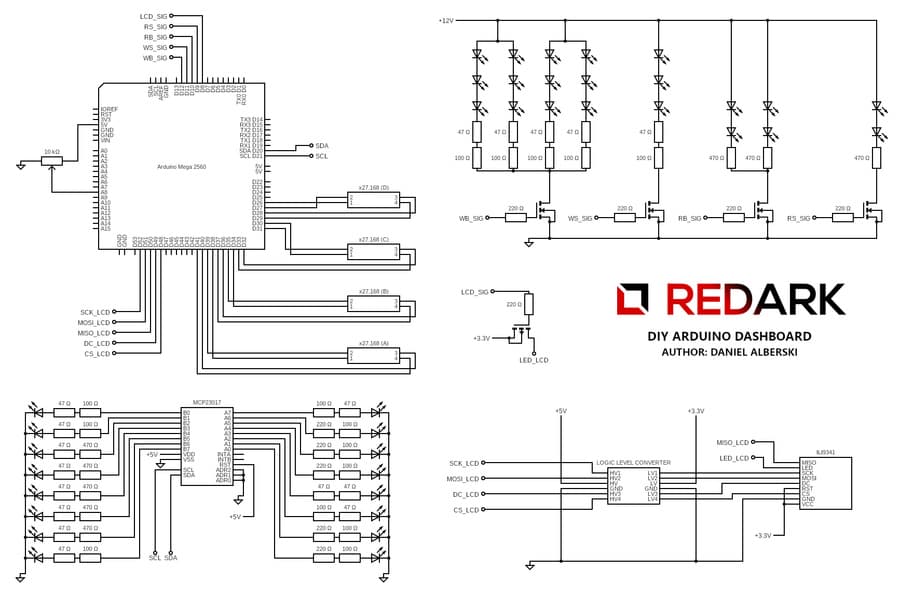
Arduino was only one part of the solution. The key was the full data flow. ETS/ATS exposes telemetry through the SCS Software library, but those values are raw. To turn them into meaningful behaviour on physical gauges, I wrote a custom C#/WPF interpreter. Running on the PC side, it read the truck state, transformed it, and sent ready commands over USB to the microcontroller.
This split was intentional. Keeping core logic on PC made debugging easier and shortened the test loop, because I could verify behaviour without rebuilding device software all the time. On Arduino, I kept only what had to stay close to hardware: gauge needles, LEDs, and LCD control. That helped me keep the system responsive despite limited compute power.
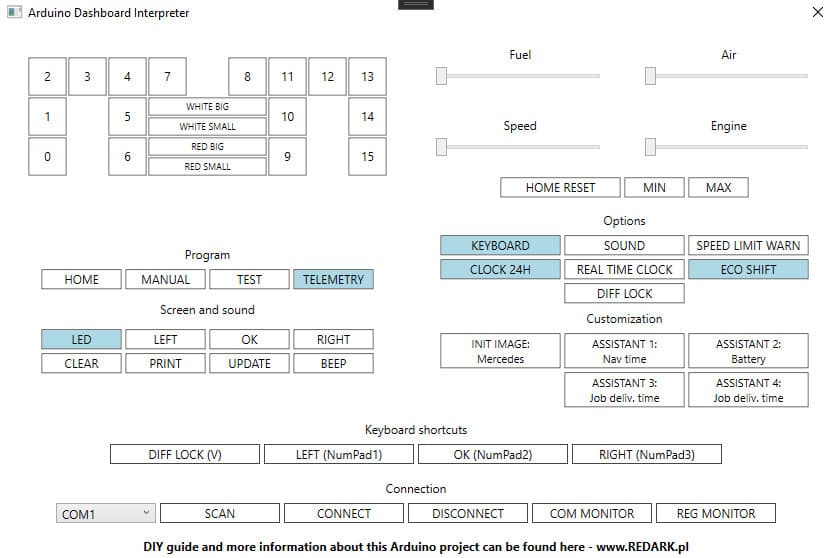
The interpreter UI also became a service panel for development and diagnostics. It let me run test modes, manually move needles, correct stepper home positions, and switch display or sound settings. During build stages, this tooling saved a lot of time.
Key technical decisions and trade-offs
The hardest part was balancing smooth needle movement with a 2.4-inch colour LCD on Arduino. The display controller and SPI bus could consume a large part of available processing time, while the project still had to update multiple independent elements at once.
I handled this with strict refresh optimisation. Instead of redrawing the full screen, I updated only the regions that actually changed, and only when necessary. I also built the UI from basic drawing primitives instead of relying on a heavy GUI layer. It was more work to implement, but it fit the hardware limits.
Another trade-off came from ETS/ATS telemetry itself. Some states I needed were not available directly. One example was differential lock status. To keep that warning light in the dashboard, I added an application-side workaround based on a dedicated keyboard shortcut and state synchronisation. It is not perfect, but in everyday use it worked reliably enough.
The third important decision was LED control. Instead of routing separate lines for each light, I used an MCP23017 I2C expander. That reduced wiring complexity, saved Arduino pins, and still gave me independent control over 16 indicators.
Physical build and DIY layer
Mechanical and visual work mattered just as much as code. I used a Volkswagen Golf IV cluster as the donor base and rebuilt it to match truck-like scales and my own indicator layout. The final assembly included a custom laser-cut plywood enclosure, fully custom wiring, and handmade gauge faces.
The gauge faces required their own design process. Standard automotive scales did not fit simulator behaviour, so I created custom graphics in my own Gauge Generator application, which I continue to develop as a separate project in this portfolio. Then I tested materials and layer composition to control light transmission. The final multilayer solution kept the faces readable in daylight and delivered strong backlight effect at night.
This part taught me a lot about tolerances and geometry, even without 3D printing. Every wire, spacer, and mount had to fit in tight physical space. I repeatedly returned to earlier steps to improve cable routing and specific mounting details.
What the user gets while driving
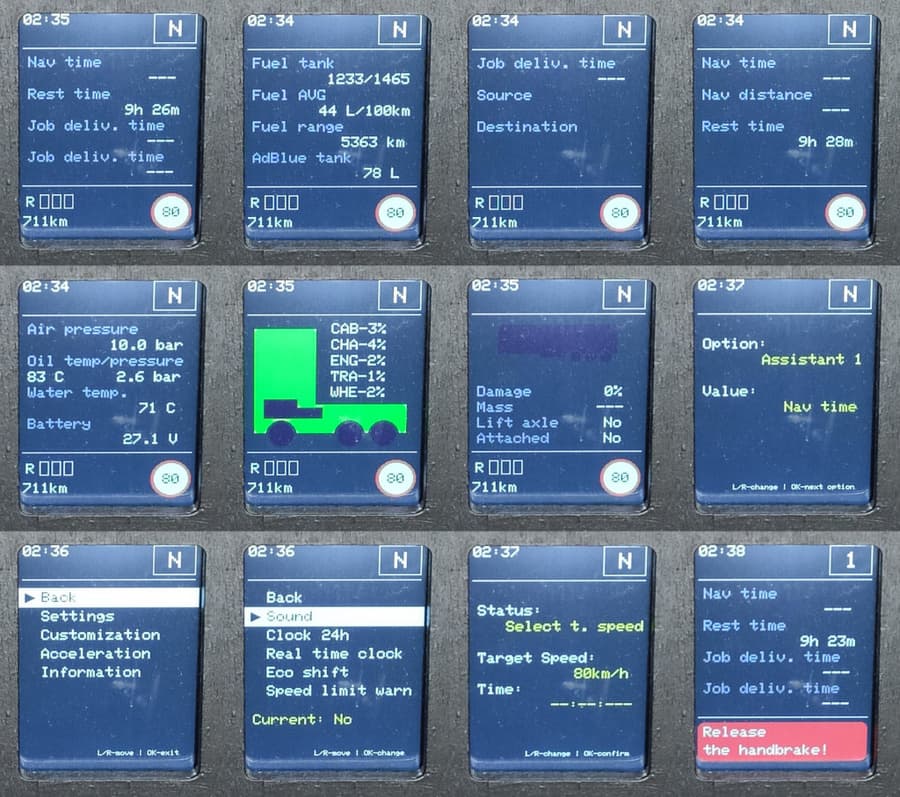
From a user perspective, this project was never just “moving needles.” I wanted the device to extend the game interface in a practical way, not simply mirror it. So beyond gauges and warning lights, I added an LCD on-board computer with multiple data views and basic personalisation.
During driving, I can read core information without constantly watching the game screen: current gear, cruise control, mileage, retarder state, speed limit, and short event messages. Visual and audio warnings also make feedback feel closer to a real vehicle than to plain game status labels.
This was an important design exercise for me because it forced information prioritisation. I had to decide what should always be visible, what should be contextual, and how to keep the display clear despite limited space and performance budget.
What I would do differently
The biggest mistake was skipping a dedicated PCB. I used manual wiring and a replacement board approach, which worked, but consumed far more time than it should have. If I rebuilt this project now, I would design a proper board from day one and leave more room for service access.
The second point is performance margin for the display path. I reached a usable result, but under more dynamic data changes there were still occasional stutters. Today I would either separate responsibilities across devices more aggressively or choose a platform with a larger compute reserve.
Even with those limitations, this stage was very valuable. I learned most of this while building, and each mistake translated into better decisions in later projects.
Final result
The final outcome is a complete ETS2/ATS dashboard: physical needles, warning lights, an on-board LCD, and a custom integration layer for game telemetry. This was not a single feature. It was a full system combining software and electronics in one cohesive device.
Most importantly, it did not end as a prototype for photos. The unit worked in real use, went through many iterations, and gave me strong foundations for later electronics projects. In that sense, DIY Arduino Dashboard was both a finished device and a turning point in how I approach projects that go beyond code.